 WordPress products
 Joomla products
 Support
 News
News Login
LoginHow to Configure Custom AI Prompts in WP Media Folder for Smarter Image SEO

Configuring custom AI prompts is a strategic step to optimize image SEO more effectively and consistently. With the right prompt settings, you can generate alt text and image descriptions that are relevant to the page context, aligned with your target keywords, and consistent with your website's writing style.
This also helps maintain brand consistency, improve user accessibility, and enhance visibility in search engines without manual effort. If you want to maximize the potential of AI for more targeted and effective image SEO, continue reading the detailed discussion in the next sections.
- Custom AI prompts help generate more relevant, accurate, and SEO-friendly alt text and image descriptions by aligning them with image context, keywords, and website tone.
- A clear image SEO strategy, including defined brand voice, page intent, and keyword context, ensures AI-generated metadata supports both user experience and search visibility.
- WP Media Folder simplifies image optimization through built-in AI Tools, allowing you to set system prompts, enable metadata fields, and generate consistent image metadata at scale.
- Continuous review, prompt refinement, and SEO performance monitoring are essential to maintain high-quality image SEO and avoid common mistakes like generic prompts or keyword overuse.
Table of content
Why Custom AI Prompts Matter for Image SEO?

Custom AI prompts for image SEO play a crucial role in ensuring that automatically generated alt text and image descriptions truly reflect the content and purpose of each image. Instead of relying on generic outputs, custom prompts allow you to guide AI to produce descriptions that are more relevant, meaningful, and aligned with your overall SEO strategy.
- Improving Alt Text Relevance and Accuracy - Custom AI prompts help ensure alt text is generated from the image content and its surrounding context. By guiding AI to focus on key visual elements and page intent, the resulting descriptions become more precise, meaningful, and useful for both users and search engines.
- Maintaining Consistent Brand and Content Style - With tailored prompts, AI-generated image descriptions can use the same tone and writing style as the rest of your website. This consistency reinforces brand identity and creates a more cohesive experience, even when managing large volumes of media content.
- Enhancing Accessibility and Search Visibility - Well-structured alt text generated from custom prompts improves accessibility for screen reader users and sends clearer signals to search engines. This combination helps your images become more discoverable in search results and supports better overall SEO performance.
Preparing Your Image SEO Strategy

Preparing your image SEO strategy is an essential step before configuring custom AI prompts. A clear strategy helps AI generate alt text and image descriptions that are not only accurate but also aligned with your SEO content goals, brand voice, and SEO priorities.
Defining Your Website Tone and Writing Style
Defining your website tone and writing style ensures that AI-generated image descriptions feel natural and consistent with your overall content. Whether your website uses a professional, conversational, or educational tone, this direction should be clearly reflected in your AI prompts.
When tone and style are well-defined, alt text and image descriptions will blend seamlessly with the surrounding content. This consistency improves user experience and helps maintain a strong brand identity across all pages and visual assets.
Identifying SEO Keywords and Context
Identifying SEO keywords and context allows AI to understand what matters most for each image. Instead of inserting keywords at random, custom prompts can guide the AI to naturally include relevant terms based on the page topic and image purpose.
By aligning keywords with image context, you help search engines better interpret your visual content. This approach improves image relevance in search results while avoiding keyword stuffing that could harm SEO performance.
Understanding Image Purpose and Page Intent
Understanding the image's purpose and the page's intent helps AI generate descriptions that truly support your content. Images used for tutorials, product pages, or blog posts each require different levels of detail and focus in their alt text.
When AI prompts consider how and why an image is used, the generated descriptions become more helpful for users and more meaningful for search engines. This alignment strengthens both accessibility and SEO outcomes across your website.
How to Configure Custom AI Prompts in WP Media Folder
Configuring custom AI prompts in WP Media Folder gives you full control over how image metadata is generated for SEO and accessibility. WP Media Folder is a WordPress media management plugin designed to help users organize, optimize, and manage media files more efficiently. With its built-in AI Tools, WP Media Folder supports custom AI prompts that automatically generate image alt text, descriptions, titles, and captions based on your website's context and content goals.
One key feature supporting custom AI prompts is the AI global settings, which include a system prompt (context). This feature lets you define how the AI interprets and describes your images. By providing clear context—such as the website type or industry—the AI can generate more accurate, relevant, and consistent image metadata across your entire media library.
Accessing AI Settings in WP Media Folder
To begin, open your WordPress dashboard and navigate to Settings > WP Media Folder > AI Tools. This section serves as the central hub for managing all AI-powered image-optimization features.
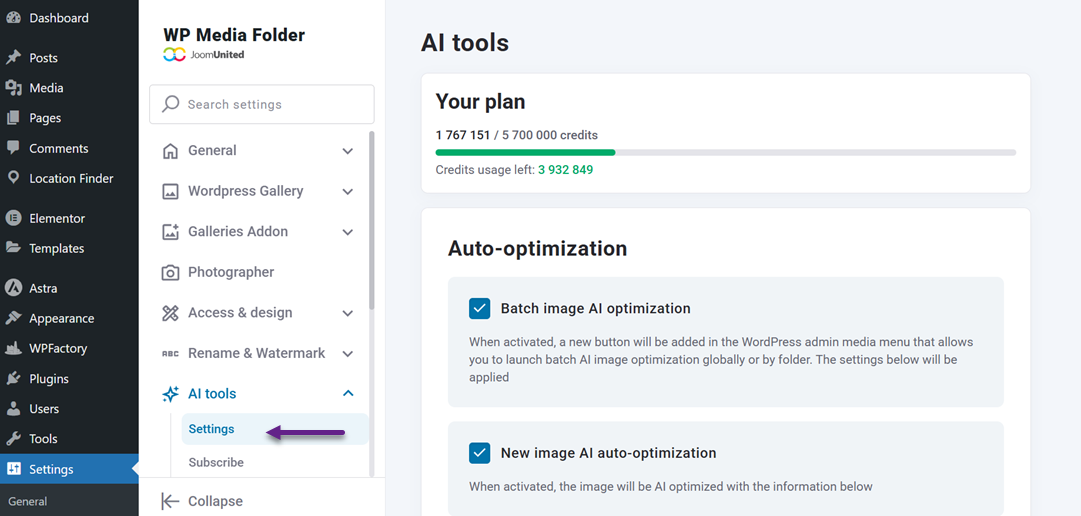
From here, you can control how AI behaves, monitor usage limits, and configure global settings that affect metadata generation.
Within the Settings tab of AI Tools, you will find options to manage AI global settings, including access to the System Prompt field. This area defines the overall context that guides how images are described, ensuring the AI understands your website's purpose and the types of content it supports.
Setting Up a Custom System Prompt
After accessing the AI settings, scroll to the System Prompt (Context) section under AI global settings. Here, you can add a short but clear description of your website's focus.
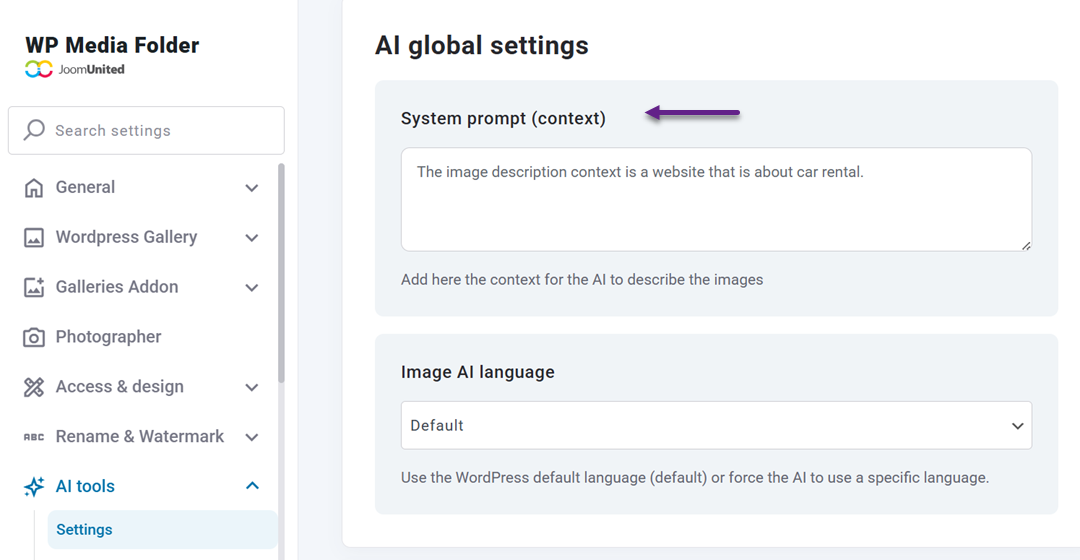
For example, if your website is about car rental services, you can set the prompt as, "The image description context is a website that is about car rental."
This system prompt acts as a foundation for how the AI interprets and describes images. By defining the context, you help the AI generate metadata that aligns with your niche, improves relevance, and avoids generic descriptions that may not support your SEO strategy.
Writing Prompts for Alt Text and Descriptions
To further optimize image metadata, ensure the relevant fields are enabled in the AI settings. WP Media Folder lets you choose which fields—such as image titles, alt text, descriptions, and captions—to generate automatically.
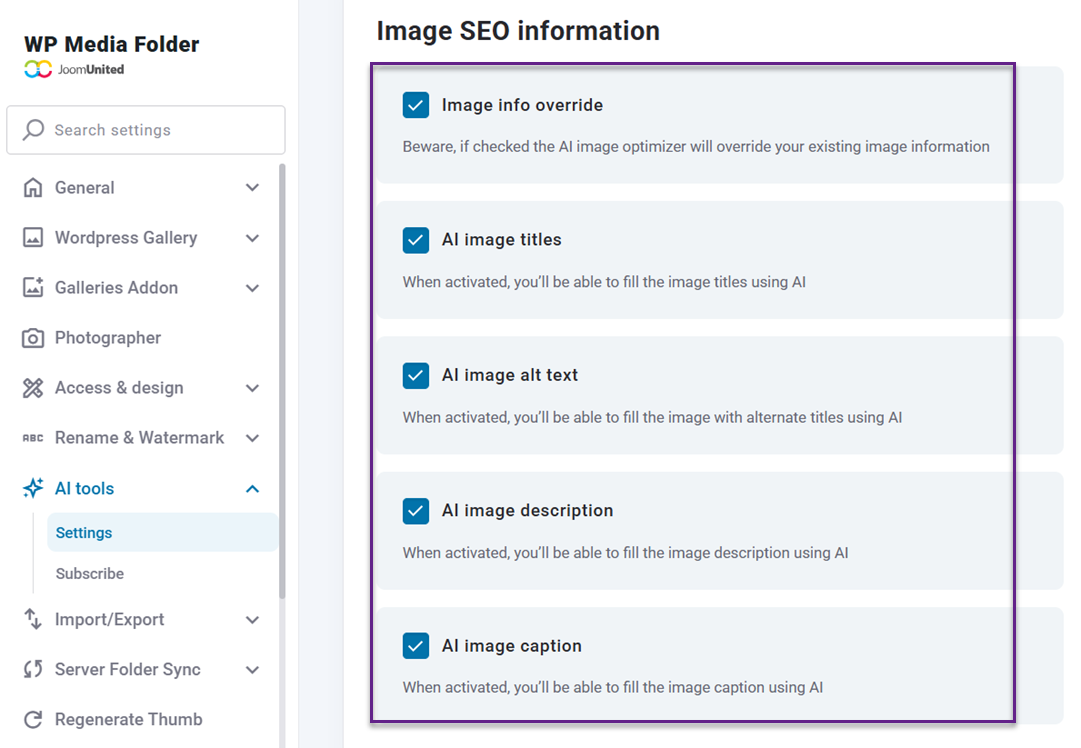
Enabling these options enables AI to consistently populate essential SEO and accessibility attributes across your media library.
You can also define the language context for metadata generation, making this feature especially useful for multilingual websites. By combining enabled metadata fields with a clear system prompt and language settings, WP Media Folder AI can generate accurate, natural alt text and image descriptions aligned with your content and SEO goals.
Supercharge your WordPress images with AI.
WP Media Folder Image AI helps you optimize images automatically, generate alt texts, improve SEO, and compress files in one click.
Upgrade your media workflow with intelligent automation.
Best Practices for Writing AI Prompts for Image SEO

Here are the best practices for writing AI prompts for image SEO to ensure that AI-generated alt text and image descriptions are accurate, natural, and aligned with your SEO strategy.
Define Image Context
Defining image context means clearly explaining what the image shows and how it relates to the surrounding content. This guidance helps AI focus on the most important visual elements instead of producing vague or overly general descriptions.
When context is included in the prompt, AI can generate alt text that is more accurate and relevant. This makes image descriptions more helpful for users and easier for search engines to understand.
Match Website Tone and SEO Goals
Matching your website tone and SEO goals ensures that AI-generated descriptions align with your brand voice. Prompts should guide AI on whether the tone should be professional, friendly, or informative, while still supporting keyword usage.
This consistency improves content quality across your website. Image descriptions feel more natural and aligned with your written content, strengthening brand credibility and SEO performance.
Use Natural, Descriptive Language
Using natural, descriptive language encourages AI to describe images clearly without forcing keywords. Prompts should prioritize readability and clarity over aggressive optimization.
Natural descriptions improve accessibility for screen reader users and reduce the risk of keyword stuffing. They also create a better experience for both users and search engines.
Optimizing Results After Applying Custom Prompts

After custom prompts are applied, it is important to ensure that the AI-generated output truly supports your SEO and accessibility goals. Regular evaluation helps you identify gaps, refine prompt instructions, and gradually improve the overall quality of image descriptions.
Review Generated Alt Text
Reviewing generated alt text helps you confirm that each description accurately represents the image and aligns with the page context. This process makes it easier to identify descriptions that are overly generic, unclear, or missing key visual details.
By consistently reviewing alt text, you can maintain high content standards and ensure AI-generated content remains aligned with your SEO strategy and brand guidelines.
Adjust Prompts Based on Results
Adjusting prompts based on actual results allows you to fine-tune how AI interprets your instructions. When generated alt text does not meet expectations, small changes in prompt wording or added context can significantly improve accuracy.
This iterative approach helps AI produce more consistent and relevant descriptions over time. As prompts improve, the quality of image SEO also becomes more stable and reliable.
Monitor SEO Performance
Monitoring SEO performance helps you measure the effectiveness of AI-generated image descriptions. Metrics such as image visibility, impressions, and engagement provide insight into how well your strategy is working.
By analyzing this data, you can continue optimizing your prompts and ensure that image SEO contributes positively to your overall search performance goals.
Common Mistakes When Using AI Prompts for Image SEO

When using AI prompts for image SEO, small mistakes can lead to low-quality alt text and missed optimization opportunities. Understanding these common issues helps you avoid ineffective outputs and ensures that AI-generated descriptions truly support both user experience and search visibility.
Using Generic Prompts
Using generic prompts provides AI with very limited guidance, often resulting in vague and repetitive image descriptions. Without specific instructions, AI cannot accurately determine what makes an image important or how it relates to the page content.
Generic outputs reduce the value of alt text for both users and search engines. Clear and detailed prompts are necessary to generate descriptions that are relevant, informative, and SEO-friendly.
Ignoring Image Context
Ignoring image context can lead AI to produce descriptions that do not align with the image's purpose. Images used in tutorials, blog posts, or product pages require different levels of detail and focus.
When context is missing, alt text may confuse users and provide weak signals to search engines. Including context in prompts helps AI generate descriptions that align with page intent and content goals.
Overusing SEO Keywords
Overusing SEO keywords in AI prompts often results in unnatural, spam-like alt text. While keywords are important, forcing them into every image description can degrade readability and the user experience.
Search engines prioritize natural language and useful content. Balanced keyword usage ensures that alt text remains clear, accessible, and effective for long-term SEO performance.
Calling all webmasters!
Save hours of manual image work with WP Media Folder Image AI. Auto-optimize images, generate alt texts, enhance SEO, and deliver lighter, faster-loading sites for your clients.
Supercharge your image workflow today!
Conclusion
Configuring custom AI prompts in WP Media Folder helps you significantly improve the quality of AI-generated alt text and image descriptions. By aligning prompts with image context, website tone, and SEO goals, you can enhance the relevance of alt text, maintain brand consistency, improve accessibility, and increase image visibility in search engines.
If you want to streamline image optimization without manual processes, now is the right time to use WP Media Folder and take full advantage of its custom AI prompts. Start configuring smarter prompts with WP Media Folder and turn your media library into a powerful asset for long-term image SEO performance.
When you subscribe to the blog, we will send you an e-mail when there are new updates on the site so you wouldn't miss them.



Comments